
Our Top Picks
 G & F Products Two-Strap Disposable Dust Masks1 Count (Pack of 50)4 x 12 x 5 Inches0 poundsCheck on Amazon

What's inside
- Contents
- What a cordless rotary tool does
- Formats: pen, standard, heavy-duty and combo
- Collets, shanks and accessory compatibility
- Speed, torque and control
- Comparison table: formats compared
- Accessories that earn their place
- Matching the tool to your projects
- Batteries and charging
- Buyer checklist
- Mistakes to avoid
- Rotary tool safety
- Frequently asked questions
- Bottom line
- Contents
- What a cordless rotary tool does
- Formats: pen, standard, heavy-duty and combo
- Collets, shanks and accessory compatibility
- Speed, torque and control
- Comparison table: formats compared
- Accessories that earn their place
- Matching the tool to your projects
- Batteries and charging
- Buyer checklist
- Mistakes to avoid
- Rotary tool safety
- Frequently asked questions
- Bottom line
As an Amazon Associate I earn from qualifying purchases. This post may contain affiliate links at no extra cost to you.
The short answer: the best cordless rotary tool is a comfortable, well-balanced unit with variable speed, a collet system that grips the accessories you use, and a battery that lasts through your typical session. For hobby work, model making, engraving and small repairs, a slim pen-style tool is usually plenty. For heavier grinding, cutting and sanding, a larger body with a stronger motor serves better. The accessory range and collet compatibility often matter more than a headline speed figure, so shop for the whole system, not only the tool.
This guide does not rank products or quote prices. It explains how rotary tools work, the formats you will find, the specifications worth reading, the accessories that make the tool useful, and the safety practices that protect your eyes, lungs and hands. Use it to narrow your search, then check current specifications and instructions for any model you plan to buy.
Contents
- What a cordless rotary tool does
- Formats: pen, standard, heavy-duty and combo
- Collets, shanks and accessory compatibility
- Speed, torque and control
- Comparison table: formats compared
- Accessories that earn their place
- Matching the tool to your projects
- Batteries and charging
- Buyer checklist
- Mistakes to avoid
- Rotary tool safety
- Frequently asked questions
- Bottom line
What a cordless rotary tool does
A rotary tool is a small, high-speed motor with a chuck or collet on the front. You clamp in a bit, wheel, disc or brush, and the tool spins it fast enough to cut, grind, sand, polish, carve or engrave. It is the workshop’s multitool for detailed jobs, the one you reach for when a full-size grinder or sander is too crude for the work.
A cordless version brings that capability to a bench, a garage corner, a boat or a car, with no cable to snag on the work. That freedom is very helpful for engraving, where a cord tugging at the hand can ruin a line, and for any job away from a power outlet. The trade-offs are limited runtime between charges and, in some cases, less sustained power than a corded tool.
Because the tool turns accessories at high speed, small differences in technique have large effects. Light pressure, correct speed and the right accessory give clean results. Heavy pressure with the wrong bit gives burns, chatter, broken accessories and frustration. Learning those basics matters more than any single feature.
Formats: pen, standard, heavy-duty and combo
Pen-style and slim tools
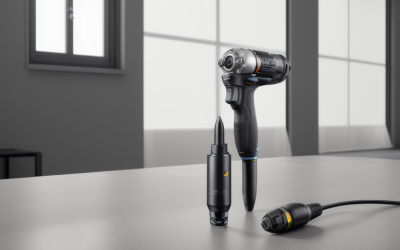
These are held like a pencil, with a slim body and a light feel. They are ideal for engraving, jewellery-style detail work, model making, cleaning small parts and fine carving. Their small motors have less power, so they are better for delicate tasks than for removing a lot of material.
Standard grip tools
The classic shape sits comfortably in the palm or between thumb and fingers and tackles a broad range of jobs. It works for light cutting, sanding, grinding, polishing and cleaning. If you are buying your first cordless rotary tool, this is usually the most sensible format.
Heavy-duty and die-grinder style tools
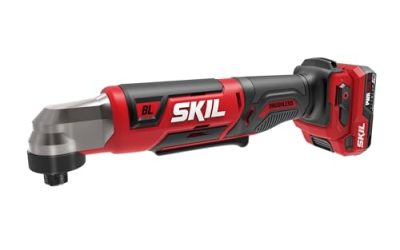
A larger body with a more powerful motor suits tougher work such as removing weld spatter, shaping metal, port grinding or cutting through bolts. Many use larger collets and heavier accessories. They are less nimble for fine work and normally need a larger battery.
Kits and multi-tool combinations
Many sets include a tool, battery, charger, a case and a pile of accessories. They are convenient for beginners, though the included accessories may be of mixed quality. Some systems also offer attachments such as flexible shafts, right-angle heads and routing bases, which extend what the tool can do.
Collets, shanks and accessory compatibility
The collet is the clamping part that grips the shank of each accessory. Different accessories have different shank diameters, and the collet must match. Many tools ship with a set of interchangeable collets or a keyless chuck that accepts a range of sizes. Before you buy, confirm which shank sizes the tool supports and compare that with the accessories you want to use.
- Interchangeable collets: hold shanks firmly and run true, but you have to swap them when the size changes.
- Keyless chucks: faster to change and accept a range of sizes, though some can slip under load or run slightly off-centre.
- Quick-change systems: let you swap bits without tools, which is handy during projects with many steps.
- Mandrels: small holders for discs and wheels. Check that the mandrel is in good condition, because a bent one causes vibration.
Accessory compatibility is where cordless rotary tool systems differ most. A large ecosystem of cutters, burrs, sanding drums and polishing wheels means you can find the right piece for any task. A closed or limited one can leave you hunting for suitable bits. Look for a tool that accepts the widely used shank sizes rather than something proprietary.
Speed, torque and control
Variable speed
Speed control is essential. High speeds suit cutting, grinding and engraving hard materials. Low speeds protect plastics, which melt when overheated, and suit polishing where excessive speed flings compound or burns the surface. A dial, a trigger or a two-speed switch are all common approaches, and a dial with clear steps is easiest to repeat from one session to the next.
No-load speed versus working speed
Listings often quote a top speed, but that figure is measured without load. Under real work the speed drops. A tool that holds its speed when you press an accessory against material feels stronger and cuts better than one that bogs down. Look for descriptions of electronic speed regulation, and read reviews for comments about performance under load.
Torque and motor type
Brushless motors are commonly found on better tools and tend to offer longer runtime and less maintenance than brushed ones. Torque matters for heavier grinding and cutting, but for fine work, smooth, controllable power is more valuable than raw force.
Ergonomics and vibration
You hold the tool close to your work for long periods, so balance matters. A slim, light tool is easier to guide precisely, while a larger one may reduce wrist fatigue on bigger jobs. Look for a textured grip, a comfortable switch position and low vibration. Heavy vibration spoils accuracy and tires the hand.
Comparison table: formats compared
This table describes general tendencies and not specific products. Confirm each model’s details with the maker.
| Format | Best for | Strengths | Drawbacks |
|---|---|---|---|
| Pen-style slim tool | Engraving, models, small parts, detailed carving | Light, precise, easy to hold for long sessions | Limited power, small battery |
| Standard grip tool | General cutting, sanding, polishing, cleaning | Versatile, widely supported accessories | A compromise for extremes of delicate or heavy work |
| Heavy-duty or die-grinder style | Metal shaping, weld cleanup, heavy grinding | Strong motor, larger accessories | Bulkier, heavier, more costly |
| Kit with accessories | Beginners and mixed home projects | Ready to use out of the box | Accessories may vary in quality |
| System with attachments | Users who want routing, flexible shaft or angled heads | Extends what the tool can do | Extra cost and storage |
Accessories that earn their place
Cutting discs
Thin cutoff wheels slice metal, plastic and fasteners. They are brittle and can shatter if twisted or pinched, so use them only as directed and always with eye protection. Reinforced wheels last longer than plain ones, but still demand care.
Grinding stones and burrs
Mounted stones sharpen blades, deburr edges and shape metal. Carbide burrs carve wood, plastic and soft metals quickly. Choose shapes for the work, such as cylinders for edges, balls for hollows, and cones for corners.
Sanding drums and flap wheels
Small sanding drums smooth curves and inside edges that a sanding block cannot reach. Replace worn sleeves instead of pushing harder with a clogged one.
Polishing wheels and compound
Felt or cloth wheels with polishing compound bring up a shine on metal, stone and some plastics. Use low speed and light pressure to avoid heat build-up.
Wire brushes
Small brushes clean rust, paint and carbon from tight spots. Wire strands can detach, so wear eye protection and keep clear of the brush’s spinning plane.
Engraving bits
Fine-pointed bits cut text and decoration into metal, glass and hard plastics. Practise on scrap, because engraving rewards patience and a steady hand.
Matching the tool to your projects
Engraving and personalising
A slim pen-style tool with fine speed control gives the best results. Mark out the design first, brace your hand on the work and move slowly. A cordless tool helps since there is no cable to tug your line.
Model making and crafts
Small sanding drums, carving burrs and cutting discs help shape plastic, wood and resin parts. Keep speed low on plastic, which melts and gums up bits when overheated.
Metalwork, sharpening and deburring
Mounted stones, flap wheels and cutoff discs are the usual accessories. A standard or heavy-duty tool with strong speed regulation suits this work. Allow metal to cool and quench or rest it as needed.
Wood carving and detail
Burrs of varying shapes remove wood quickly, and a steady hand creates fine detail. Wood dust is a respiratory hazard, so use extraction or a suitable mask.
Cleaning, polishing and restoration
Brushes and felt wheels revive tarnished metal, remove rust and polish small items. Test accessories on a hidden area first, since aggressive abrasion can ruin a finish.
Batteries and charging
Cordless rotary tools range from slim units with built-in rechargeable cells to larger tools that share removable packs with a drill and other equipment. Built-in batteries keep the tool light but cannot be swapped when they run low. Removable packs let you swap in a charged one, which is a huge advantage for longer projects.
Runtime depends on accessory type and load. Light engraving sips power, while heavy grinding drains it fast. Use the lowest effective speed to save charge, and keep spare cells or a charging cable handy where the tool supports it.
Follow the manufacturer’s charging and storage guidance. Do not leave a tool charging unattended for long periods, and do not use damaged batteries or chargers. Store the tool somewhere dry and away from extreme heat.
Buyer checklist
- The format matches my main projects, whether fine detail or heavy grinding.
- Variable speed is included, ideally with speed regulation under load.
- The collet or chuck accepts the shank sizes of accessories I want.
- The accessory range is wide and replacement parts are easy to find.
- The grip and weight feel comfortable for long sessions.
- The battery is removable or the built-in cell offers acceptable runtime.
- The charger and charging method are clear and convenient.
- A work light or clear view of the bit is present.
- Eye and respiratory protection are on my shopping list.
- The manual, warranty and return terms are readable before I order.
Mistakes to avoid
Choosing power over control
A strong but twitchy motor is harder to use on detail work. Pick the format and speed range for your most frequent task.
Ignoring shank compatibility
Accessories that do not fit your collet are useless. Confirm shank size before buying bits, and avoid forcing accessories into the wrong collet.
Applying too much pressure
Pushing hard causes heat, vibration and broken accessories. Let the bit do the cutting with light, steady contact.
Running too fast on plastics
Plastic melts and clogs bits. Use a lower speed and keep the tool moving.
Using worn or damaged accessories
Cracked wheels, bent mandrels and clogged sleeves cause vibration and injuries. Inspect accessories before each use and discard any that look suspect.
Buying the biggest kit blindly
A hundred-piece accessory set sounds like value, but many pieces may be duplicates you will never use. Buy the kinds of bits your projects require, and add more later.
Rotary tool safety
Rotary accessories spin extremely fast, and small pieces can break or fly off. Dust, sparks and heat also create hazards, so treat even a small tool with respect.
- Always wear eye protection. A full face shield adds protection when cutting with thin discs. Ordinary glasses are not always enough.
- Protect your lungs. Grinding metal, sanding wood and cutting plastics create fine particles. Use a suitable respirator or extraction, and work in a ventilated area.
- Secure the workpiece. Clamp small items rather than holding them in your fingers, which could be struck if the bit skips.
- Inspect accessories before use. Do not use cracked, chipped or bent items, and keep within the speed limits printed on them.
- Remove the battery for changes. Taking out the pack or switching the tool off and locking it avoids accidental starts when changing bits or collets.
- Watch for sparks and heat. Keep flammable materials, solvents and sawdust away from grinding areas. Metal and accessories get hot enough to burn.
- Tie back hair and avoid loose clothing. Spinning accessories can catch fabric and hair.
- Protect your hearing. High-pitched grinding can be loud over long sessions.
- Read the manual. Check current safety instructions, accessory ratings and speed recommendations for your specific model.
Frequently asked questions
What can a cordless rotary tool do?
It can cut, grind, sand, polish, carve, engrave and clean, depending on the accessory fitted. It is best at small, detailed work and awkward spots.
Is a cordless rotary tool as powerful as a corded one?
Not always. Corded tools tend to sustain power longer, while cordless models offer convenience and freedom. Stronger cordless options exist, but check how they perform under load and with your battery.
Which accessories should I buy first?
Start with a few cutting discs, a handful of burrs, small sanding drums and a polishing set. Buy more when a specific project requires them.
Can I use it to engrave metal and glass?
Yes, with a suitable engraving bit and a steady hand. Practise on scrap first. Wear eye protection and consider a respirator when working with glass dust.
Do I need a flexible shaft?
Not for most jobs, but it reduces hand fatigue and allows fine control on carving and engraving by letting you hold a lighter handpiece. Check that it is compatible with your tool.
How long do batteries last?
That depends on the load. Light engraving can run a long time, while heavy grinding drains the pack quickly. Removable packs let you swap in a spare, while built-in batteries need a charging break.
Why does my tool vibrate?
The usual causes are a bent mandrel, an unbalanced or damaged accessory, or a loose collet. Stop, remove the accessory and inspect it. Replace anything worn or damaged.
Is a rotary tool safe for beginners?
Yes, with proper protection and practice. Wear eye protection, clamp your work, keep the speed appropriate and avoid forcing the tool. Start on scrap to learn how each accessory behaves.
Bottom line
Decide whether your work is fine detail or heavier grinding, then pick a format, speed control and collet system to match. Check how broad the accessory range is, and weigh battery type and runtime against how long your sessions run. Protect your eyes, lungs and hearing, clamp your work, and confirm current specifications before you order.
When you are ready to compare options, you can browse cordless rotary tools, look at rotary tool accessory kits, add engraving bits, grab a face shield and pick up a dust respirator.
Disclosure: As an Amazon Associate, we earn from qualifying purchases. Links marked as sponsored may earn us a commission at no extra cost to you.
Related guides
More from Amazon
Programs that pair well with the guide above. Offers and eligibility are set by Amazon and may change.
A free business account with business pricing and bulk-buying tools for work, shop or home office.
Create a business accountFree shipping on eligible items, Prime Video and more. Eligible new members can start with a free trial.
Start a Prime free trialAudiobooks and podcasts to listen to on the go. Eligible new members can start with a free trial.
Try Audible freeAd-free music streaming. Eligible new subscribers can start with a free trial.
Try Music Unlimited freeAs an Amazon Associate we earn from qualifying purchases.

Write Your Review
No reviews yet. Be the first to share your experience!