What's inside
- Which Jigsaw Blades Fit a Black and Decker Jigsaw?
- How to Choose the Right Black and Decker Jigsaw Blade
- What Does TPI Mean on a Jigsaw Blade?
- What Are Jigsaw Blades Made Of?
- How to Replace a Black and Decker Jigsaw Blade Safely
- Common Black and Decker Jigsaw Blade Problems
- Frequently Asked Questions
- Final Verdict
- Which Jigsaw Blades Fit a Black and Decker Jigsaw?
- How to Choose the Right Black and Decker Jigsaw Blade
- What Does TPI Mean on a Jigsaw Blade?
- What Are Jigsaw Blades Made Of?
- How to Replace a Black and Decker Jigsaw Blade Safely
- Common Black and Decker Jigsaw Blade Problems
- Frequently Asked Questions
- Final Verdict
As an Amazon Associate I earn from qualifying purchases. This post may contain affiliate links at no extra cost to you.
The right Black and Decker jigsaw blades depend on your saw’s blade holder, the material you’re cutting, and the finish you want. Many BLACK+DECKER jigsaws accept universal 1/4-inch shank blades, but compatibility varies by model: some accept U-shank and T-shank blades, while others require a specific type. Check your saw’s manual before buying a replacement.
For most DIY projects, start with a wood-cutting blade for lumber and plywood, a fine-tooth blade for cleaner cuts, and a metal-cutting blade for sheet metal or suitable metal stock. Matching the blade to the material and cut is more important than choosing a blade simply because it carries the BLACK+DECKER name.
Which Jigsaw Blades Fit a Black and Decker Jigsaw?
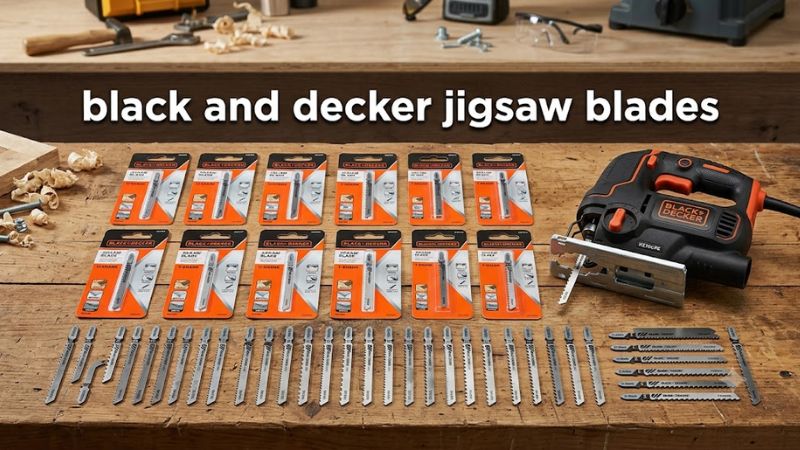
Check the exact jigsaw model before choosing between U-shank and T-shank blades. The manufacturer confirms that its BDEJS300C corded jigsaw accepts both types, while its 75-626 assortment is specifically designed for U-shank jigsaws.
The following table provides a starting point, not a substitute for checking your model’s instructions.
| Jigsaw or blade type | Compatibility guidance | What to check |
| BLACK+DECKER BDEJS300C | Accepts U-shank and T-shank blades | Confirm the blade is seated and secured correctly |
| BLACK+DECKER BDCJS20B | Accepts U-shank and T-shank blades | Follow the model’s blade-change instructions |
| BLACK+DECKER 75-626 blade set | U-shank blades | Confirm your saw accepts U-shank blades |
| Older BLACK+DECKER jigsaw | Depends on the model | Find the model and type number, then consult its manual |
| Other BLACK+DECKER jigsaws | May support one or both shank styles | Never assume compatibility from the brand alone |
Sources: BLACK+DECKER product specifications and official support documentation. Compatibility information reviewed October 20, 2026.
U-shank vs. T-shank jigsaw blades
The shank is the part of the blade that fits into the jigsaw’s blade holder.
- U-shank blades: Have a U-shaped or notched mounting end. Some older jigsaws and compatible universal-clamp models use this style.
- T-shank blades: Have a T-shaped mounting end and are common on modern jigsaws with compatible quick-change systems.
- Dual-compatible jigsaws: Accept both styles when the manufacturer explicitly specifies that capability.
A blade that looks close to the correct shape is not necessarily compatible. Do not force a blade into the holder or modify its shank to make it fit.
How to identify your jigsaw model
- Turn off the saw and disconnect its power source. For a cordless model, remove the battery before inspecting the blade holder.
- Locate the model number on the tool’s label.
- Find the type number if one is listed; this may be needed to identify the correct manual or parts information.
- Consult the model-specific instruction manual and confirm the permitted blade shank.
- Check the replacement blade’s packaging for the shank type and intended material.
BLACK+DECKER directs owners to its Tool ServiceNet support resource to locate manuals and parts information using the product model and type number.
How to Choose the Right Black and Decker Jigsaw Blade
Choose a blade based on four factors: material, material thickness, tooth spacing, and the type of cut. A blade intended for fast rough cuts will not necessarily produce the clean edge needed for cabinetry or visible trim.
| Cutting task | Blade to look for | Main consideration |
| General lumber and framing | Coarse-tooth wood blade | Prioritizes cutting speed |
| Plywood and finished panels | Fine-tooth wood blade | Helps reduce splintering |
| Curves and intricate shapes in wood | Narrow scrolling blade | Easier to steer around curves |
| Thin sheet metal | Fine-tooth metal blade | Helps control cutting and reduce snagging |
| Aluminum and other nonferrous metals | Blade explicitly rated for the metal | Tooth geometry and blade material must suit the workpiece |
| Mixed materials | Multipurpose blade rated for the specific materials | Convenience may come with finish or speed trade-offs |
BLACK+DECKER’s 75-626 assortment illustrates the range available: it includes rough and smooth wood-cutting blades, scrolling blades, and medium- and thin-metal-cutting blades. It is a U-shank set, so it is not a universal choice for every jigsaw.
1. Wood-cutting blades
Wood blades are designed for materials such as softwood, hardwood, plywood, and fiberboard, depending on their tooth design and construction.
- Coarse teeth: Useful when speed matters more than a smooth edge.
- Fine teeth: Better suited to cuts where visible splintering must be minimized.
- Narrow blades: More suitable for tight curves and intricate patterns than wide blades.
For plywood, laminate-faced panels, or finished furniture parts, consider a blade specifically designed for cleaner cuts. Support the workpiece properly, follow the blade’s cutting-direction requirements, and test on scrap material before making the final cut.
Do not assume every wood blade is suitable for thick hardwood. Check the blade’s stated application and cutting capacity, and avoid forcing the saw through the workpiece.
2. Metal-cutting blades
Metal-cutting jigsaw blades generally have finer teeth than coarse wood blades. The appropriate blade depends on the metal, its thickness, and the blade manufacturer’s stated application.
Before cutting:
- Confirm that the blade is rated for the specific metal.
- Clamp the workpiece securely and support it close to the cutting area.
- Use the saw’s recommended speed and operating instructions for that material.
- Wear appropriate eye protection and control sharp metal chips.
- Allow the blade to do the work instead of applying excessive forward pressure.
A blade intended for thin sheet metal may be unsuitable for thick steel stock. Likewise, aluminum and steel should not automatically be treated as interchangeable applications.
3. Scrolling blades for curved cuts
A scrolling blade is useful when cutting curves, patterns, and detailed shapes in wood. Its narrower profile can make it easier to turn than a wider general-purpose blade.
For better results, mark the curve clearly, secure the workpiece, and guide the saw gradually. Tight turns require an appropriate blade and may need relief cuts to prevent binding.
Do not twist the saw aggressively while the blade is moving. If the blade begins to bind, switch off the tool and wait for it to stop before correcting the setup.
What Does TPI Mean on a Jigsaw Blade?
TPI means teeth per inch. It describes how many teeth are present along one inch of the blade and helps indicate the blade’s cutting characteristics.
| Tooth pattern | Typical application | Trade-off |
| Lower TPI | Faster, rougher cuts in suitable wood | Usually leaves a rougher edge |
| Higher TPI | Finer cuts and many thin-material applications | Can cut more slowly and may clog or overheat if misused |
| Variable tooth spacing | Can accommodate a range of material thicknesses, depending on blade design | Performance still depends on material and blade geometry |
BLACK+DECKER’s blade-selection guidance states that more teeth generally produce a smoother finish and recommends keeping at least two teeth in the material during cutting.
Treat these as selection principles rather than universal rules. Tooth geometry, blade width, blade material, workpiece thickness, and the saw’s operating speed all influence the result.
How many teeth should engage the workpiece?
Aim to keep at least two teeth engaged in the material during the cut, as recommended in the manufacturer’s guidance. If the workpiece is too thin for the blade’s tooth spacing, the blade may catch or produce a rough cut.
For thin sheet metal, select a suitable fine-tooth blade. For thick wood, a blade with an appropriate tooth pitch and cutting capacity is usually more suitable than an extremely fine-tooth blade.
What Are Jigsaw Blades Made Of?
Blade material affects flexibility, wear resistance, and suitability for different workpieces. Check the blade packaging or technical specifications rather than relying on appearance alone.
| Blade material | General characteristics | Common applications, subject to the manufacturer’s rating |
| High-carbon steel (HCS) | Flexible; intended for relatively soft materials | Softwood and some plastics |
| High-speed steel (HSS) | Harder cutting material | Certain metals |
| Bi-metal (BIM) | Combines different steel properties for improved durability in suitable applications | Repeated cutting across specified wood, plastic, or metal applications |
| Carbide-grit or carbide-tooth construction | Designed for particular abrasive or difficult materials | Only materials specifically listed by the blade manufacturer |
These categories are general guidance, not a guarantee that every blade of a given construction can cut every material in its row. Some specialist applications require dedicated blades, and not every jigsaw blade is suitable for ceramic, fiberglass, or abrasive composites.
How to Replace a Black and Decker Jigsaw Blade Safely
The exact blade-change procedure depends on the jigsaw’s design. Some models use a tool-free clamp, while others may require screws or a different locking mechanism. Follow the instructions for your particular model.
- Disconnect the power. Unplug a corded saw or remove the battery from a cordless saw. Wait for the blade to stop and cool before handling it.
- Confirm compatibility. Check the replacement blade’s shank and intended material against the saw’s manual.
- Release the blade holder. Operate the clamp or fastener exactly as described in the manual.
- Remove the old blade carefully. Avoid touching sharp teeth or a blade that may still be hot from cutting.
- Insert the replacement blade. Follow the specified insertion direction and ensure the shank is fully seated.
- Secure the holder. Check that the clamp or fastener returns to its proper locked position.
- Inspect before restarting. Confirm that the blade is correctly installed and that the shoe, guard, and other relevant components are properly positioned.
- Test safely. Reconnect the power and follow the manual’s operating procedure, keeping hands clear of the blade path.
If the blade does not lock securely, stop. Do not operate the jigsaw until the cause has been identified and corrected.
Common Black and Decker Jigsaw Blade Problems
| Problem | Possible cause | What to do |
| Blade will not fit | Wrong shank style or incompatible holder | Verify the model and blade specifications |
| Blade slips out | Incorrect installation, damaged blade, or a faulty holder | Disconnect power and inspect according to the manual |
| Cut wanders off the line | Dull or unsuitable blade, excessive pressure, or poor workpiece support | Check the blade, secure the workpiece, and guide the saw without forcing it |
| Wood splinters badly | Blade tooth pattern or cutting direction is unsuitable for the finish required | Try a suitable fine-cut blade and test on scrap |
| Blade bends during cutting | Excessive side pressure, binding, or an unsuitable blade | Stop, check the setup, and replace a damaged blade |
| Cutting becomes unusually slow | Worn teeth, unsuitable blade selection, or excessive resistance | Inspect the blade and verify that it suits the material |
| Blade or workpiece becomes excessively hot | Friction, unsuitable operating conditions, or an inappropriate blade | Stop cutting and reassess the blade, speed, and setup |
These symptoms do not establish a single diagnosis. If the blade holder is damaged, the saw has abnormal vibration, or the tool continues to malfunction after basic checks, discontinue use and consult qualified service personnel.
Frequently Asked Questions
Do all Black and Decker jigsaws use the same blades?
No. Some models accept both U-shank and T-shank blades, while other models may specify only one type. Check the exact model’s manual before purchasing replacement blades.
Can I use Bosch or DEWALT jigsaw blades in a Black and Decker jigsaw?
Potentially, yes, if the blade’s shank, dimensions, and intended application match the saw’s requirements. Brand compatibility alone is not sufficient; verify the blade and tool specifications.
Are T-shank blades better than U-shank blades?
T-shank blades are common on modern quick-change jigsaws, but neither shank style is automatically better for cutting performance. The important considerations are correct fit, secure retention, blade design, and suitability for the workpiece.
Which Black and Decker jigsaw blade is best for plywood?
A fine-tooth blade designed for plywood or clean wood cuts is a sensible starting point. Support the panel, use a suitable cutting direction and setup, and test on scrap to check the finish before cutting the final piece.
Final Verdict
Choosing Black and Decker jigsaw blades starts with compatibility, not brand. Confirm whether your exact model accepts U-shank blades, T-shank blades, or both. Then choose a blade designed for the material, thickness, and finish you need.
For a typical DIY workshop, a suitable wood-cutting blade, a fine-cut blade, a scrolling blade, and a metal-cutting blade cover many common tasks. Buy a mixed set only after checking its shank type and included blade applications.
Before ordering, verify the model number on your saw, consult the manufacturer’s manual, and inspect the blade packaging. That simple check can prevent a compatibility mistake and help you get cleaner, safer cuts.
Related guides
- Drill Bit for Ceramic Tile: How to Choose the Right Bit and Drill Without Cracking the Tile
- BLACK+DECKER Mouse Sander Pads: Sizes, Grits, Compatibility, and Replacement
- 1/4 Drill Bit in mm: Exact Size, Conversion Chart, and Practical Guide
- Best Drill Bits for Stainless Steel: 5 Top Picks for Home and Workshop Use