What's inside
- Which BLACK+DECKER Mouse Sander Pads Should You Choose?
- How to Choose the Right Sandpaper Grit
- How to Check BLACK+DECKER Mouse Sander Pad Compatibility
- How to Replace BLACK+DECKER Mouse Sander Pads
- Common BLACK+DECKER Mouse Sander Pad Problems
- Safety and Maintenance Tips
- Frequently Asked Questions
- Conclusion
- Which BLACK+DECKER Mouse Sander Pads Should You Choose?
- How to Choose the Right Sandpaper Grit
- How to Check BLACK+DECKER Mouse Sander Pad Compatibility
- How to Replace BLACK+DECKER Mouse Sander Pads
- Common BLACK+DECKER Mouse Sander Pad Problems
- Safety and Maintenance Tips
- Frequently Asked Questions
- Conclusion
As an Amazon Associate I earn from qualifying purchases. This post may contain affiliate links at no extra cost to you.
Choosing the right BLACK+DECKER Mouse sander pads starts with identifying your sander model, selecting the appropriate sandpaper grit, and confirming that the replacement sheet fits the backing pad. The correct abrasive helps remove material efficiently, smooth rough surfaces, and prepare wood for finishing without leaving unnecessarily deep scratches.
BLACK+DECKER Mouse sanders use shaped sanding sheets designed for detail work, corners, edges, and small surfaces. Replacement options include different abrasive grits, but availability and compatibility vary by model and market. Before purchasing, check the model number on your tool and compare it with the replacement sheet’s specifications.
This guide explains how to choose the right sandpaper, distinguish sanding sheets from backing pads, replace worn abrasives, and troubleshoot common attachment problems.
Which BLACK+DECKER Mouse Sander Pads Should You Choose?
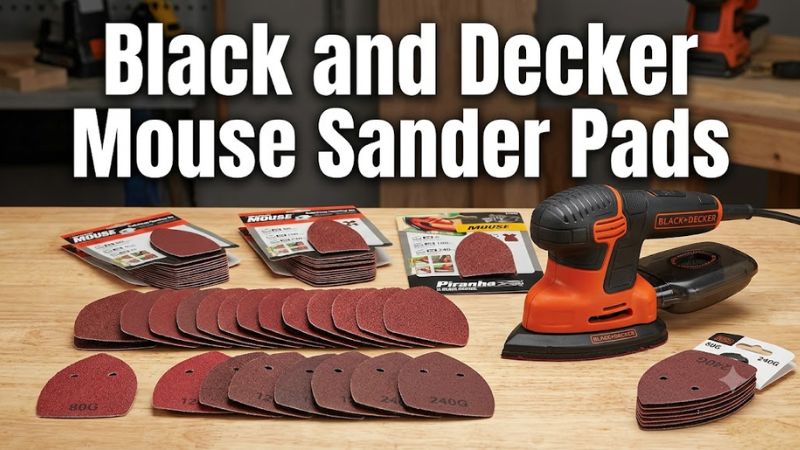
For most woodworking projects, choose a replacement sheet specifically identified as compatible with your Mouse sander. Select the grit according to the amount of material you need to remove and the finish you want to achieve.
80-Grit Sanding Sheets
An 80-grit sheet is suitable for relatively aggressive sanding on appropriate wooden surfaces. It can help smooth rough boards, remove minor surface irregularities, and prepare wood for subsequent sanding stages.
However, coarse abrasives leave more visible scratches than finer grades. Avoid using them aggressively on thin veneer, delicate trim, or surfaces where removing too much material could damage the workpiece.
120- and 180-Grit Sanding Sheets
Medium grits are useful for smoothing surfaces after initial sanding. Moving from 80 grit to 120 grit can help reduce the scratches left by the coarser abrasive. A further progression to 180 grit may be appropriate when the project requires a smoother finish.
The correct sequence depends on the wood species, surface condition, coating, and finishing requirements. You do not necessarily need to use every grit for every project.
220- and 240-Grit Sanding Sheets
Fine abrasives are suitable for light smoothing and certain finishing-preparation tasks. They remove material more slowly than coarse sheets and can help refine a surface that has already been adequately smoothed.
Follow the finish manufacturer’s instructions when sanding between coats. Some coatings require a particular abrasive grade or a different preparation method.
Assorted Sanding Sheet Packs
An assorted pack can be convenient if you work on different surfaces or need multiple abrasive grades. Before buying, check the package contents to determine which grits are included.
Do not assume that every assorted pack contains the same grit combination or that all Mouse-compatible sheets fit every generation of the tool.
How to Choose the Right Sandpaper Grit
Sandpaper grit refers to the abrasive particle size classification. Lower grit numbers generally remove material faster and leave deeper scratches, while higher numbers generally produce a finer surface.
| Grit | Typical application | Main consideration |
| 40–60 | Heavy sanding on suitable surfaces | Aggressive material removal; may damage delicate workpieces |
| 80 | Initial sanding of rough wood | Usually requires follow-up sanding for a smoother finish |
| 120 | General surface smoothing | Helps reduce scratches from coarser abrasives |
| 180 | Finer smoothing and surface preparation | Suitable when the project requires a more refined surface |
| 220–240 | Fine sanding and selected finishing tasks | Removes material slowly and is not ideal for heavy stock removal |
These are general sanding guidelines, not a guarantee that every grit is available for every Mouse model.
Choosing Grit for Common Projects
Rough wood: Start with 80 grit when the surface requires substantial smoothing and the material can tolerate coarse sanding.
Furniture refinishing: Choose the abrasive according to the existing finish and the condition of the wood. Use particular care with veneer and thin decorative surfaces.
Painted surfaces: Confirm that the coating can be sanded safely before beginning. Older paint may contain lead, so ordinary power sanding may be inappropriate without proper assessment and controls.
Light surface smoothing: Consider 180–240 grit when appropriate for the material and intended finish.
Between finish coats: Follow the coating manufacturer’s preparation instructions instead of assuming that one grit is suitable for every product.
When progressing through multiple grits, remove the scratches left by the previous abrasive before moving to the next grade.
How to Check BLACK+DECKER Mouse Sander Pad Compatibility
The term “sander pad” can refer to either the disposable abrasive sheet or the reusable backing pad attached to the tool. Identifying which component you need helps prevent incorrect purchases.
Sanding Sheets
Sanding sheets are consumable abrasives that wear down during use. They must match the sander’s working shape, attachment system, and dust-collection arrangement.
Before purchasing replacement sheets, check:
- The full sander model number.
- The sheet’s dimensions and triangular profile.
- The attachment method used by the backing pad.
- The position of dust-extraction holes.
- Any model-specific restrictions stated by the manufacturer.
A sheet that looks similar to the original may still fit poorly or obstruct dust collection.
Backing Pads
The backing pad is the reusable base that holds the abrasive sheet. Depending on the model, the sheet may attach through a hook-and-loop surface or another manufacturer-specified system.
If the abrasive repeatedly detaches despite being correctly fitted, inspect the backing surface for wear or damage. A cracked, loose, or deteriorated pad may need replacement.
Do not assume that a generic triangular backing pad fits every Mouse sander. Confirm the exact part number using the tool’s model information and parts diagram.
Finding Your Sander’s Model Number
- Disconnect the tool from its power source before inspecting it.
- Locate the identification label on the tool body.
- Record the full model number and any additional type number.
- Compare those details with the replacement accessory’s compatibility information.
- If you need a backing pad, consult the parts diagram for the exact model.
If the model or accessory compatibility remains unclear, contact BLACK+DECKER support or an authorized service provider before ordering.
How to Replace BLACK+DECKER Mouse Sander Pads
Follow these steps when replacing a worn sanding sheet. If your particular model uses a different attachment system, follow the instructions in its manual.
Step 1: Disconnect the Power
Unplug a corded sander or remove the battery from a cordless model. Wait until all movement has stopped before handling the abrasive sheet.
Step 2: Remove the Worn Sanding Sheet
Carefully peel away the old sheet. Avoid tearing or damaging the backing pad while removing adhesive-backed or hook-and-loop abrasives.
Step 3: Inspect the Backing Pad
Check the attachment surface for worn material, tears, cracks, or loose sections. If the pad cannot hold a compatible sheet securely, address the problem before using the tool again.
Step 4: Align the Replacement Sheet
Match the sheet’s outline and dust-collection holes to the backing pad. If the sander uses a detail-finger attachment, verify that the replacement abrasive is intended for that configuration.
Step 5: Secure the Sheet
Attach the sheet evenly according to the manufacturer’s instructions. Make sure it sits flat and remains firmly secured.
Do not operate the sander if the abrasive is loose, incorrectly positioned, or damaged.
Step 6: Check Dust Collection
Ensure that the sanding sheet’s holes are aligned with the corresponding openings in the backing pad. Check the dust container or collection system and reinstall it correctly.
Step 7: Resume Sanding Carefully
Reconnect the power only after completing the inspection. Start on a suitable test area, apply light and even pressure, and keep the sanding surface moving as appropriate for the material.
Common BLACK+DECKER Mouse Sander Pad Problems
| Problem | Possible cause | Recommended action |
| Sanding sheet keeps coming loose | Worn backing surface, incorrect sheet, or poor alignment | Disconnect power and verify the sheet and backing pad |
| Poor dust collection | Blocked holes, full collector, or misaligned paper | Clear the openings and inspect the collection system |
| Deep scratches appear | Grit is too coarse, debris is trapped, or pressure is excessive | Clean the workpiece and use an appropriate finer grit |
| Sanding sheet wears quickly at the tip | Concentrated wear during detail sanding | Check the attachment and use the correct replacement sheet |
| Backing pad is cracked or damaged | Wear, impact, or deterioration | Stop using the tool and identify the correct replacement part |
These symptoms can have several causes, so inspect the tool and abrasive before deciding that a particular component needs replacement.
Replace the sanding sheet when its abrasive surface becomes worn, clogged beyond useful cleaning, or damaged. If a correctly fitted sheet repeatedly detaches, inspect the backing pad rather than repeatedly replacing the abrasive.
Safety and Maintenance Tips
Mouse sanders are useful for detail work, but sanding can produce airborne dust and damage a surface when the wrong abrasive or excessive pressure is used.
- Wear suitable eye protection and respiratory protection appropriate to the material and dust exposure.
- Use dust extraction where available and maintain adequate ventilation.
- Assess older paint for hazardous substances before sanding. Do not treat ordinary dust masks or basic dust collection as sufficient protection against lead exposure.
- Keep your hands clear of the moving abrasive surface.
- Disconnect the power before changing sheets, clearing blockages, or inspecting the backing pad.
- Avoid forcing the pointed end into corners, as excessive pressure can wear the tip quickly and damage the workpiece.
- Clean the tool and dust collector according to the manufacturer’s instructions.
- Do not apply liquids or solvents to electrical components unless the manufacturer specifically permits them.
If the sander develops unusual vibration, a loose backing pad, damaged wiring, or another mechanical or electrical fault, stop using it until the problem has been addressed.
Frequently Asked Questions
1. What size sandpaper fits a BLACK+DECKER Mouse sander?
The correct size is the sheet specified for your particular Mouse model. Match the model number, abrasive profile, attachment system, and dust-hole layout rather than relying on the triangular shape alone.
2. What grit sandpaper comes with a BLACK+DECKER Mouse sander?
The included grit depends on the model and package configuration. Check the original package contents or the matching product manual before purchasing replacement sheets, because included accessories may differ between models.
3. Can I use regular sandpaper on a BLACK+DECKER Mouse sander?
You can use alternative sandpaper only if it can be fitted securely, matches the required profile, and does not obstruct dust collection. Purpose-made compatible sheets are generally the simpler option because their shape and openings are designed for the tool.
4. When should I replace the Mouse sander’s backing pad?
Replace or service the backing pad when its attachment surface is damaged, it cannot retain a compatible sheet securely, or the component is cracked or loose. Worn sandpaper alone does not necessarily mean the backing pad needs replacement.
Conclusion
Choosing the right BLACK+DECKER Mouse sander pads involves matching the replacement sheet to the exact tool model and selecting a grit suited to the workpiece. Coarse paper helps with initial material removal, medium grits refine the surface, and fine abrasives support selected finishing tasks.
Before purchasing, verify the model number, sheet profile, attachment method, and dust-hole alignment. If the backing pad is damaged, identify the correct replacement component rather than assuming that a generic pad will fit.
For safer sanding and better surface results, use the appropriate abrasive, apply controlled pressure, maintain dust collection, and follow the instructions for your specific sander.