What's inside
As an Amazon Associate I earn from qualifying purchases. This post may contain affiliate links at no extra cost to you.
Cordless soldering irons are useful for service work when an outlet is out of reach: repairing a sensor lead, touching up a low-voltage connection, or making a quick joint in a vehicle or control cabinet. They are not a substitute for a temperature-controlled bench station. Tip temperature, recovery time, and battery runtime are harder to manage in a small cordless tool, and wind or cold metal can make a marginal iron struggle.
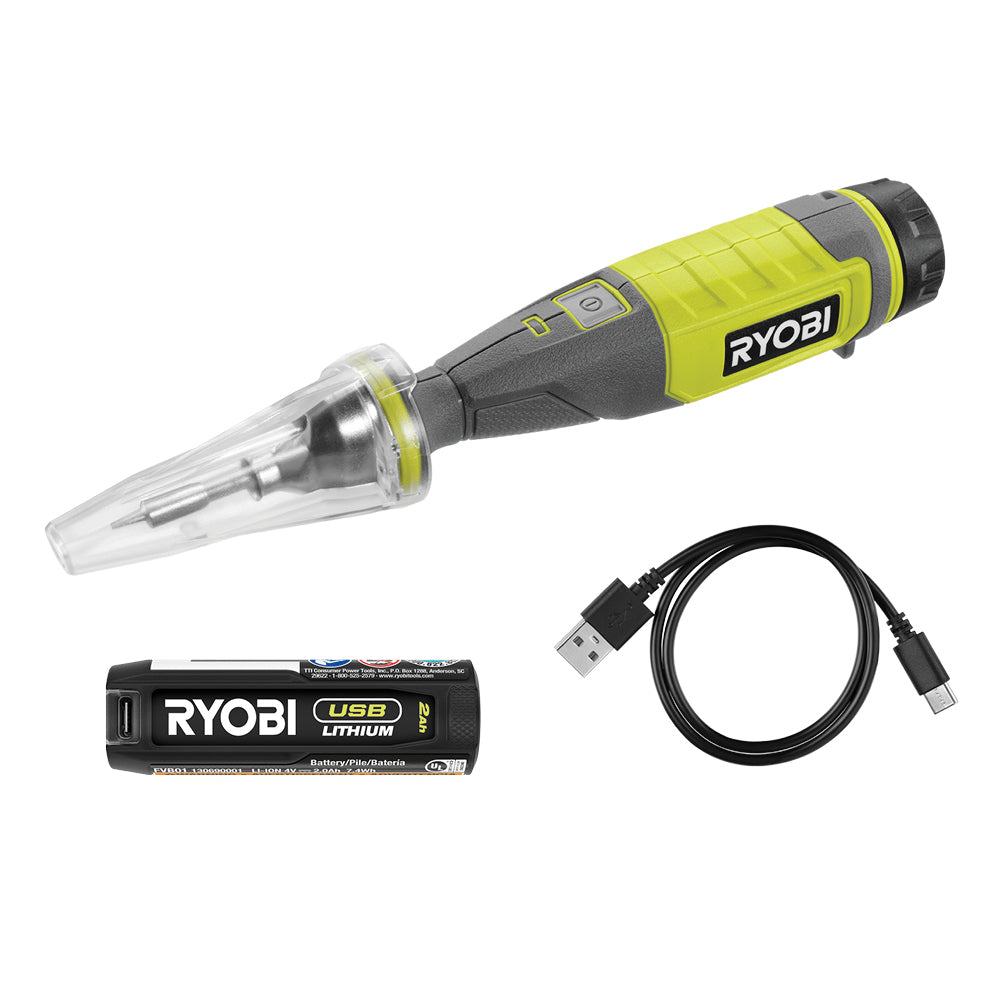
For occasional repairs, a compact USB-powered iron may be enough. If you already own a major tool battery platform, a platform-compatible iron can make sense for longer jobs. Choose based on the work and the battery you actually have, not the largest temperature number on the package.
As an Amazon Associate we earn from qualifying purchases at no extra cost to you.


What matters for electrical service work
Temperature control: A thermostat or electronic temperature setting is more useful than a simple on/off switch. Many electronics and wire joints are handled around 300–370°C (572–698°F), though the right setting depends on solder, tip, and workpiece. Lead-free solder often needs more heat than leaded solder. Avoid holding a hot tip on a circuit board to compensate for poor recovery; that can lift pads or damage nearby parts.
Tip shape and power: A chisel tip transfers heat better than a fine needle tip for most wire and terminal work. A fine tip can reach small pads, but it may not deliver enough heat to a thick connector. Power ratings are not directly comparable across tools, so check whether replacement tips are available and whether the iron can maintain heat on a representative joint.
Runtime and readiness: Small USB irons are light and easy to carry, but their runtime and heat recovery are limited. Battery-platform irons avoid a separate battery, but the tool and battery can be bulky around a crowded panel. Confirm whether the battery is included, how the iron turns off, and whether it has a stand or cap for safe storage.
Cordless iron types compared
| Type | Best fit | Main trade-off |
|---|---|---|
| USB rechargeable | Small repairs, field kits, light wire work | Limited runtime and heat recovery; battery is built in |
| USB-C powered, external source | Occasional jobs near a power bank or vehicle USB outlet | Needs a suitable power source and cable; performance varies |
| Tool-platform battery iron | Repeated work when you already own that battery system | Heavier and less convenient in tight spaces; battery may be sold separately |
| Gas-powered iron | Remote jobs where charging is impractical | Open flame and fuel handling; less convenient for electronics-sensitive work |
Which type should you buy?
For a few small repairs a month, a USB iron is usually the sensible, cheaper choice. It takes less room in a service bag, and you avoid buying a separate platform battery and charger. Look for a stable temperature setting, replaceable tips, a clear ready indicator, and a cap or stand. Search for a USB rechargeable soldering iron, then check the included tip sizes and replacement-tip availability before buying.
Choose a tool-battery iron if you make many joints on a call, already carry the matching batteries, or need to work away from charging for extended periods. The battery platform is the real buying constraint: an iron tied to a system you do not own can cost more than a good compact iron once you add a battery and charger. Check whether the tool accepts the batteries you already use; do not assume every product from a brand shares the same battery fit. A cordless soldering iron for an 18V battery platform is worth considering when that ecosystem is already in your kit.
An external USB-C iron is a reasonable middle ground if you have a capable power bank or a reliable vehicle supply. It can be cheaper than a platform tool, but the source must deliver the power the iron needs. A weak port may prevent the iron from reaching temperature or cause it to cycle under load. For an emergency kit, test the exact iron, cable, and power bank together rather than assuming any USB-C connection will work.
Battery, safety, and field use
Do not judge runtime from battery capacity alone. Iron power draw, temperature setting, ambient conditions, and time spent waiting all matter. A lithium-ion pack may run the heater for a useful stretch, but a cold pack or a succession of large joints can expose the limits quickly. Keep a charged spare if downtime matters, and let a hot iron cool before packing it against cables, plastic, or battery packs.
Use ventilation and eye protection, and keep the tip away from wire insulation and nearby harnesses. Soldering is not a reliable fix for every electrical connection: automotive, building, and industrial work may require a crimp, approved connector, or specified termination instead. Solder can wick under insulation and create a stiff section that fails from vibration. Follow the equipment maker’s repair requirements, especially on safety circuits and mains wiring.
For the joint itself, clean and tin the tip, heat the workpiece rather than melting solder directly onto the iron, and use only enough solder to wet the connection. If the joint does not flow promptly, stop and reassess the tip, temperature, and workpiece size. Repeatedly dwelling on a pad or terminal is a warning that the iron is underpowered or the technique is wrong. A small brass-wool cleaner, rosin-core solder suited to the job, and a heat-resistant stand are more useful additions than an oversized collection of tips.
A practical buying checklist
Before ordering, verify four things: the iron reaches a controllable working temperature; compatible replacement tips are sold; the power source matches your actual work duration; and the tool can be parked or capped safely between joints. For small electronics and occasional low-voltage repairs, a compact USB iron is often enough. For repeated service calls, an iron that uses batteries already in your cordless kit saves charging logistics, but only if its size and heat delivery suit the connections you make.
FAQ
Which type should you buy?
Related guides
- Longest Lasting Lawn Mower Battery: AGM vs Lithium vs Flooded Lifespan and Cost per Season
- Duralast Gold Lawn Mower Battery Review: U1 Fit, CCA and When to Pay for AGM
- Greenworks Pro 80V 21-Inch Mower Review: Runtime Math, Push vs Self-Propelled and Yard Fit
- Bosch High Pressure Washer Gun Replacement: Fittings, Adapters and What Fits Your Model