What's inside
As an Amazon Associate I earn from qualifying purchases. This post may contain affiliate links at no extra cost to you.
If you need a BLACK+DECKER drill charger, the safest way to find the right replacement is to identify your drill’s battery model, voltage platform, and original charger specification. BLACK+DECKER offers different charging systems, and a charger that fits physically is not necessarily compatible with every battery.
For many newer US-market cordless drills, the manufacturer offers lithium-ion chargers for its 12V MAX and 20V MAX POWERCONNECT battery platforms. For example, the BDCAC202B and LCS1620B support specified 12V MAX and 20V MAX lithium-ion slide-pack batteries. Older drills may use different battery designs and charging systems, so check the exact model before purchasing a replacement.
This guide explains how to identify your charger, select a compatible replacement, troubleshoot common charging problems, and avoid battery or electrical hazards.
How to Find the Correct BLACK+DECKER Drill Charger
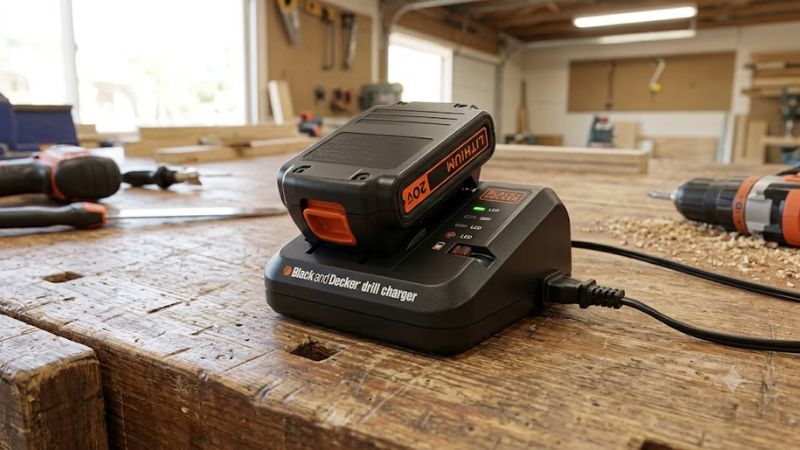
Start with the battery and charger labels rather than choosing a charger based only on the drill’s brand or appearance.
- Identify the battery model
Remove the battery from the drill, if removable, and inspect its label or molded markings. Record the model number, voltage, battery chemistry, and capacity in amp-hours (Ah).
- Find the original charger’s model number
Check the bottom of the charger housing. For some corded adapter-style chargers, the model number may be printed or engraved on the plug housing.
- Confirm compatibility
Check the manufacturer’s compatibility information or the exact drill manual. Verify the battery platform, charging interface, chemistry, and electrical specifications before using a replacement.
If you cannot identify the charger, look up the drill’s model and type number in the manufacturer’s official service documentation. The model number on the drill alone may not identify the exact charger supplied with every kit or regional variant.
BLACK+DECKER Charger Compatibility: Common Models Explained
The following examples illustrate why checking the charger model matters. These are manufacturer-documented products, not universal replacements for every BLACK+DECKER drill.
| Charger model | Manufacturer-stated compatibility | Important limitation |
| BDCAC202B | BLACK+DECKER 12V MAX and 20V MAX POWERCONNECT lithium-ion slide-pack batteries | Not a universal charger for older battery systems or other voltage platforms |
| LCS1620B | BLACK+DECKER 12V MAX and 20V MAX lithium-ion slide-pack batteries | Confirm the exact battery and regional model before use |
| Older model-specific chargers | Depends on the original drill and battery system | Match the exact model and follow its manual |
The BDCAC202B is a 2-amp lithium-ion charger. BLACK+DECKER states that it can charge a 1.5Ah lithium-ion slide-pack battery in 45 minutes or less under its specified conditions. That figure should not be applied to every battery capacity or charger.
The LCS1620B is another manufacturer-listed option for compatible 12V MAX and 20V MAX lithium-ion batteries. The fact that two chargers support the same broad voltage platforms does not mean they are interchangeable with every older BLACK+DECKER battery.
Important: BLACK+DECKER’s US 20V MAX designation refers to maximum initial voltage measured without a workload; the nominal voltage is 18V. Do not confuse that labeling convention with a different battery platform that happens to have a similar physical shape.
How to Troubleshoot a BLACK+DECKER Drill Charger
If your drill battery will not charge, the cause could be the power supply, battery temperature, dirty contacts, a worn-out battery, or a faulty charger. A flashing light alone does not confirm which component has failed.
Follow this inspection sequence before replacing anything.
1. Check the electrical supply
- Confirm the outlet works with a suitable household device.
- Inspect the charger’s power cord, plug, and housing for visible damage.
- Check that the charger’s input-voltage rating matches the local electrical supply.
- If the charger or cord is damaged, stop using it and arrange an appropriate replacement.
Do not open the charger or attempt internal electrical repairs.
2. Let an overheated battery cool
A battery that has just powered a drill through sustained work may be too warm to charge. BLACK+DECKER specifically identifies a warm battery with a rapidly flashing charger indicator as a possible temperature-related charging problem.
- Remove the battery from the charger if it is safe to do so.
- Place it in a dry, well-ventilated location away from direct sunlight and heat sources.
- Let it return to a suitable charging temperature, following the battery manual.
- Reinsert it and check the indicator again.
If charging still fails, consult the manufacturer’s troubleshooting instructions rather than repeatedly cycling the battery.
3. Inspect the battery and charging contacts
With the charger unplugged, visually inspect accessible contacts for dirt, corrosion, moisture, or damage.
- Keep the contacts dry.
- Follow the manual’s instructions for cleaning accessible surfaces.
- Do not scrape contacts with metal tools or bridge terminals.
- Do not use a battery with a cracked case, leakage, swelling, or signs of heat damage.
If the battery or charger has physical damage, stop using it.
4. Check the indicator lights
Indicator behavior varies by charger model. Consult the specific manual to determine what a solid light, flashing light, or absence of illumination means.
| Symptom | Possible explanation | Recommended action |
| No indicator light | No power, poor connection, or charger fault | Check the outlet and visible connections |
| Rapid flashing with a warm battery | Battery may be too hot | Allow it to cool before trying again |
| Charging never completes | Battery, charger, or connection problem | Check the manual and seek service if unresolved |
| Battery charges but runs down quickly | Reduced battery capacity or a tool-related issue | Compare performance with a known-compatible battery if available |
| Charger or battery becomes unusually hot, smells burnt, or shows damage | Possible electrical or battery fault | Disconnect power if safe and stop using the equipment |
These are troubleshooting possibilities, not definitive diagnoses. Do not assume that every flashing light has the same meaning.
5. Determine whether the battery or charger has failed
If the outlet is working and the battery is at a suitable temperature, the next step is to establish whether the battery, charger, or drill is responsible.
- Use only a known-compatible battery and charger for any comparison.
- Do not test the battery with an improvised power supply.
- Do not attempt to jump-start a battery by connecting its terminals to another battery.
- If the fault persists, contact BLACK+DECKER support or an authorized service provider.
A battery that has deteriorated internally may no longer accept or retain a charge even when the charger is functioning correctly.
How to Charge a BLACK+DECKER Drill Battery Safely
Follow the instructions supplied with the exact battery and charger. Charging procedures can differ between older nickel-cadmium batteries and newer lithium-ion models.
- Inspect the equipment. Check for cracked housings, damaged cables, leaking batteries, or other visible defects.
- Choose a suitable location. Use a dry, ventilated area away from combustible materials and excessive heat.
- Verify the power supply. Confirm that the charger’s input rating matches the local mains supply.
- Insert the battery correctly. Align the battery with the charger and seat it as described in the manual. Never force it into place.
- Monitor the charging process. Follow the model-specific indicator instructions and the manufacturer’s guidance for charging time.
- Finish as directed. Remove the battery or leave it in the charger only as permitted by the manufacturer’s instructions.
Never charge a visibly damaged battery, expose a charger to water, or attempt to dismantle the charging electronics.
Important note for international users
A charger intended for the US market may be rated for 120V AC at 60Hz. For example, BLACK+DECKER documents those input specifications for the LCS12 and LCS20 chargers. Do not assume that a US charger is suitable for a 220–240V supply.
Before using a charger in another country, verify its input-voltage and frequency ratings and the requirements in the exact manual. A plug adapter changes the physical connection; it does not convert voltage.
What to Check Before Buying a Replacement Charger
The lowest-priced charger is not necessarily the right replacement. Check these details before making a purchase.
| Check | What to verify | Why it matters |
| Charger model | Exact model number and approved replacement | Helps establish compatibility |
| Battery voltage | Correct voltage platform | Different platforms may not be interchangeable |
| Battery chemistry | Lithium-ion, NiCd, or another specified type | Charging requirements differ |
| Connector or slide interface | Correct physical interface | Fit alone does not prove electrical compatibility |
| Input rating | Voltage and frequency for your region | Prevents unsuitable mains connections |
| Output specification | Manufacturer-approved charging output | Must match the supported battery system |
| Battery capacity | Supported capacity and expected charging time | Larger batteries may take longer to charge |
| Package contents | Charger only or battery-and-charger kit | Avoids paying for or expecting accessories that are not included |
| Condition and warranty | Genuine, compatible replacement and applicable warranty | Helps reduce the risk of unsuitable or defective equipment |
Check whether the replacement is an original BLACK+DECKER charger or a third-party product. For a third-party charger, require explicit compatibility with your exact battery model and chemistry rather than relying on a general claim that it fits BLACK+DECKER drills.
Frequently Asked Questions
1. Are all BLACK+DECKER drill chargers interchangeable?
No, BLACK+DECKER drill chargers are not all interchangeable. Some newer chargers support multiple specified lithium-ion platforms, while older batteries may require model-specific chargers. Confirm compatibility using the battery and charger model numbers.
2. How long does a BLACK+DECKER drill battery take to charge?
Charging time depends on battery capacity, charger output, battery temperature, and the specific charging system. BLACK+DECKER states that its BDCAC202B can charge a compatible 1.5Ah lithium-ion slide-pack battery in 45 minutes or less. Larger batteries and other chargers may take longer.
3. Why is my BLACK+DECKER drill charger blinking red?
A blinking red light can indicate a charging condition or fault, depending on the charger model. If the battery is warm after use and the charger flashes rapidly, overheating is one possible explanation. Let the battery cool and consult the correct manual for the indicator’s meaning.
4. Can I use a universal charger for a BLACK+DECKER drill battery?
Only if the charger is explicitly designed for the exact battery’s electrical specifications and chemistry. A matching connector or similar voltage label is not sufficient proof of compatibility. A manufacturer-approved charger is the safer choice.
Final Verdict
Choosing the right BLACK+DECKER drill charger starts with identifying the battery and original charger models. The BDCAC202B and LCS1620B are documented options for specified 12V MAX and 20V MAX lithium-ion slide-pack batteries, but neither should be treated as a universal solution for every BLACK+DECKER drill.
If your battery will not charge, check the power supply, temperature, visible contacts, and model-specific indicator instructions before replacing components. Stop using any damaged or unusually hot equipment, and seek manufacturer support if the problem persists.
For the most reliable replacement, record the battery model number and charger model number, then confirm compatibility through BLACK+DECKER’s official documentation before buying.